Why can’t I log in after turning this thing on? I’ve entered the password as well. Isn’t the account root?
As root, try pinging the IP to see if it’s reachable. If not, open a ticket and ask.
1 Like
In the first three days after I bought it, there were zero packet losses. A few days ago, when the LAX-9929 route fluctuated, the daily packet loss rate stayed below 0.1% all day; I’d say it’s pretty stable.
3 Likes
I didn’t expect the 4837 to be sold out; is the West Coast really this short on stock?
1 Like

SJC’s 9929 is also sold out; the device shortage is worse than expected.
2 Likes
There really isn’t anything left. I don’t know what phone I could buy now. Prices are inflated everywhere. Do you have any other recommendations, bro?
If you’re using China Unicom or China Mobile, you can try Idle Fish’s E-series (though China Telecom is also not bad, but Telecom is more recommended the P-series).
The E-series page was restocked with around 30 units yesterday; there are still a few left (three networks: 9929/9929/CMIN2) 链接直达
Although it’s a bit pricey, it should be a decent option for now. Auntie Meixi West US is replenishing hardware and IPs, but stock will take a while to become available. And this 9929 is in the SJC region, and it’s better to use than Auntie Meixi’s EB-9929 in Los Angeles.
Although Idle Fish’s prices are higher than White Silk’s, the network routes and ticket support are top-notch, and ticket replies are very fast. A drawback is that after being blocked, changing IPs is fairly expensive; it’s recommended to fully understand the setup before purchasing. Also, downstream of the K-series is generally broadcast IPs with poorer IP quality; if you’re focused on unlocking, it’s best to pair with a local/residential IP.
2 Likes
I just placed an order for the San Jose - Premium Mainland-Optimized BGP (9929) annual plan.
After installing the system and running a quick test, it’s completely unreachable from Mainland China—ping doesn’t work at all, and HTTP can’t be accessed either. I opened a ticket requesting to change the IP or get a refund. They’ll also charge an IP fee, won’t they?
1 Like
Right after I booted up, I got an IP that’s blocked by the firewall. The seller usually offers a free replacement.
Eight hours have already passed since I checked. What happens next?
1 Like
I’ve been refreshing the ticket status all morning, and at 11:53 I got a reply that the IP has been changed for free; everything is fine now.
Although I feel like joking that there should be an IP check before selling a new device, as long as the ticket is processed smoothly, that’s enough.
4 Likes
As long as it works, that’s fine. I checked this morning and both the cheapest options for White Silk 4837 and 9929 are out of stock—which one did you buy?
Yes, if IP detection could be added it would be even nicer. Right now merchants don’t do this; adding it would greatly deepen goodwill.
The cheapest options are all gone, so I chose the San Jose, USA - Premium Mainland-Optimized BGP (9929) - Plan C
2048 MB of RAM
20 GB SSD
2000 GB data transfer (500 Mbps bandwidth)
So far it looks okay, hoping it stays stable going forward.
There’s also a minor gripe: the new machine shows that an OS is installed, but it’s actually not there, and you need to reinstall the OS manually (even though it’s supposedly one-click).
Also, the available OS options are quite old, limited to the following, with a limit of 30 installations per year
- CentOS 8 Stream
- Debian 11 (Bullseye)
- Debian 10 (Buster)
- Ubuntu 18.04 LTS (Bionic)
- Ubuntu 20.04 LTS (Focal)
1 Like
有优惠码吗?
没有的,而且159.99的套餐缺货了。目前299.99CNY/年的套餐可用
好,我就直接买300的
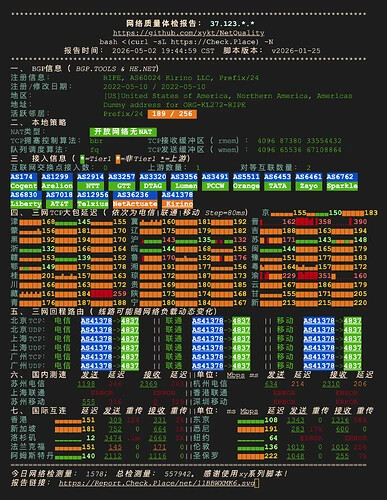

测试脚本故障/临时路由被藏都有可能
看三网tcp大包是否断流、看国内测试/国际互联,是没问题的
好吧,感谢佬
1 Like